The room
Share the floor plan, seating layout, stage position, ceiling height, access route, available power and any house AV or rigging rules.

Corporate event AV planning guide
You do not need to choose microphones, screens or lights first. Start with the venue, audience, program, presenters and deliverables. Those decisions determine the system and crew.
Before the equipment list
A room name and a guest count are not a production brief. These four inputs let a production team identify coverage, sightlines, signal paths, labor and the questions that still need an answer.
Share the floor plan, seating layout, stage position, ceiling height, access route, available power and any house AV or rigging rules.
Record the expected room count, remote audience, accessibility needs and whether attendees need to ask questions or appear on camera.
Provide a draft run of show with sessions, speakers, panels, playback, walk-on music, transitions, breaks and simultaneous rooms.
List what must leave the room: a remote feed, recordings, presentation files, edited sessions, interview footage or nothing beyond the live show.
Planning sequence
Ask about loading, freight access, power, rigging, house systems, union or house-head requirements, internet ordering and the time available for setup and strike.
Mark which rooms run at the same time. A main session, breakout and interview room cannot share the same operator simply because they appear on one schedule.
Collect presentation decks, video files, remote contributors, confidence-monitor needs and any screen content that changes between sessions.
Speaker coverage, screen size, camera positions and lighting depend on room shape and sightlines. Test the plan against the least forgiving seat.
Define who owns audio, video, lighting, playback, cameras, the stream and show calling. A supplier list is not a responsibility map.
Test speaker entrances, microphones, playback, slide advances, remote joins and transitions. The value of rehearsal is finding the dependency while there is still time to change it.
System decisions
Equipment belongs in the plan only after it has a clear job. This table is a briefing aid, not a substitute for room design or an engineering check.
| System | What it must do | What changes the design | What to test |
|---|---|---|---|
| Audio | Carry speech, playback and program audio evenly through the room. | Room shape, audience layout, panel size, audience questions and remote contributors. | Every microphone path, playback level, room coverage and the feed sent to recording or streaming. |
| Video and screens | Keep slides, video and live camera images readable from the intended seats. | Viewing distance, ambient light, screen position, content format and camera sightlines. | Every presentation device, aspect ratio, embedded video, confidence feed and backup playback route. |
| Lighting | Light presenters and the room for the audience, cameras and the intended atmosphere. | Stage size, ceiling and rigging options, room daylight, scenic elements and camera exposure. | Presenter positions, cue changes, camera image and any house-control handoff. |
| Hybrid feed | Give remote attendees intelligible program audio and a useful view of the room. | Platform, remote speakers, audience interaction, captions, recording and venue connectivity. | Primary and backup internet, remote return audio, presentation sharing and the encoded program feed. |
| Show control | Keep presenters, playback, lighting and room changes on the same run of show. | Session count, simultaneous rooms, cue density, speaker changes and client approvals. | Comms, cue ownership, file versions, escalation contacts and the recovery plan. |
Timing
Confirm the room, access, house-service rules, power, rigging, internet and the hours available for load-in, rehearsal and strike.
Give every bidder the same rooms, program, audience, deliverables and service level. List unknowns rather than letting each company price a different assumption.
Lock file ownership, presenter requirements, cue responsibility, crew calls, room access and the rehearsal plan. Keep a named route for late changes.
The workbook covers rooms, program, production requirements, quote comparison and procurement. Unknown fields stay visible instead of turning into hidden assumptions.
Planning in practice
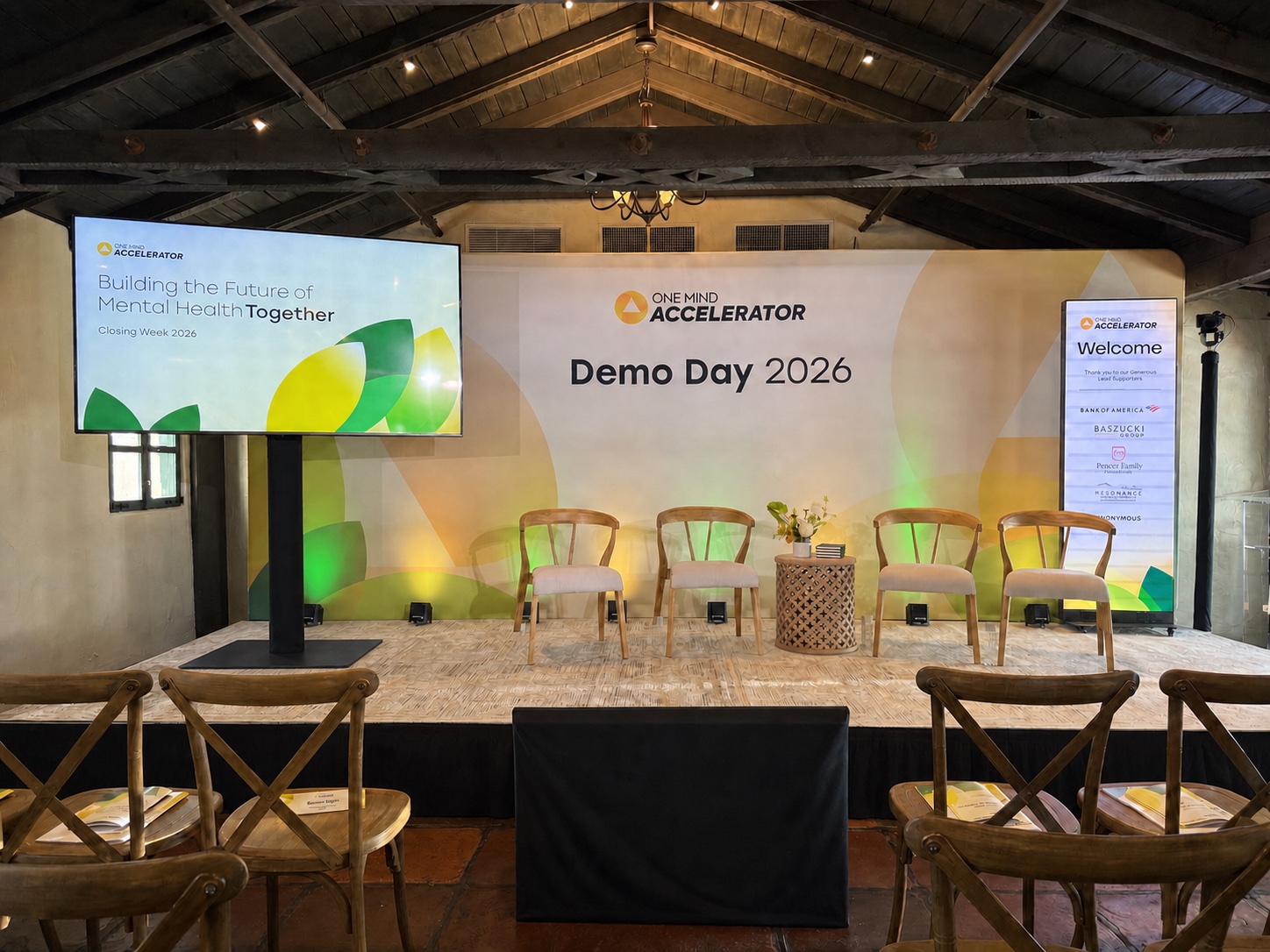
Westwave’s One Mind program ran a main session, conference room and outside tent concurrently at Allied Arts Guild. The project record documents six spaces, a 500-person investor summit, a separate Zoom room and redundant event connectivity.
The useful planning question was not “which mixer?” It was which spaces were live together, which program feeds crossed between them and who could own each room at the same time.
Common questions
Audiovisual, or AV, covers the sound, video, displays, projection, lighting, staging, recording, streaming, control systems and technical crew used to run the program.
Start with the venue and rooms, production dates, audience, seating, draft run of show, presenters, playback, remote participants, recording needs, access and the service level you expect. An equipment list can follow.
Bring AV into the venue decision before the contract is final when possible. Power, rigging, internet, loading, house AV requirements and the setup window can materially change the production scope.
Rehearse when the show depends on presenter handoffs, playback, remote contributors, camera blocking, lighting cues or several systems changing together. A microphone check alone does not test those handoffs.
Compare the program against what the venue package includes. Some events fit the house system. Others need one team to own several rooms, cameras, streaming, scenic, lighting or deliverables across the whole program.
Planning a San Francisco event?
That is enough to begin a production conversation before the equipment list is fixed.